What is AWS?
AWS Cloud?
To
understand why this concept exists, we have to delve into a little
detail about how an internet company works. Imagine you were Adam
D'Angelo (founder and CEO of Quora) a few years back, starting up a cool
new Q&A website. You've just made the first prototype, and it's
becoming popular, but the computer you set up in your garage can't
handle the traffic. You have to scale up. How do you do it?
- Well, websites need to run on servers. A server can be as simple as your regular desktop, but if you want to handle all the traffic, you'll need something dedicated; something with good specs; and specific features that make it more suitable for running 24/7. You need features like remote-management, redundant power supplies, extra network connectivity, and shaped to slide into standard "racks" to help save space. You might need several servers, one with a lot of hard drives to house all the data; one with a lot of RAM to handle the database load; one with a lot of CPU to handle the suggestion algorithms. The three servers might set you back $30,000 in capital cost.
- A server needs a good, fast, and reliable internet connection. Maybe two internet connections, in case one of them goes down for some reason. Maybe you pay $10,000 a year for that.
- A server needs stable power. You don't want your server to reboot and risk corruption whenever the power goes out for some reason. Maybe you want to have a backup batteries or generator. Throw in another $10,000 capital.
- A server needs good cooling. You don't want your servers to overheat on a hot day, especially once you start scaling up to multiple servers in the same room. You need AC installed, and that AC needs its backup power too. Call that another $10,000 capital.
- A server needs someone to monitor and maintain it. Someone who knows about server management, and be available 24/7 in case something needs to be fixed. So you need a full-time sysadmin, maybe pay them $70,000 - $90,000 a year.
Suddenly
you find yourself having to pay $50,000 in capital costs and maybe
$100,000 annually operating cost. That's a lot of money. What's
frustrating is: you're not using 100% of all of these servers or your
staff - you've bought spare capacity on your servers, AC, power, and
network capacity for future use, but you're not using that capacity yet.
(These
are what racks of servers look like, most of the slide-out units are
servers, others are networking equipment, power management, etc. Note
the room would have special floor panels to route all the wires and
power; and powerful air conditioning to keep the room cool. It suffices
to say that running servers is an expensive operation. Source: Wikimedia Commons.)
You
wish you could pay for just the computing power that you use, instead
of having to pay everything up-front and still only to leave most of
your capacity unused. Luckily for you, some enterprising companies out
there have realised that you're not alone. Every company out there
wanting to host a web service suffer from the same issues of needing to
buy, manage, and staff their servers; and worry about up-front costs of
the equipment, and underutilising them. What if instead of every company
having to buy, maintain, and staff their own servers, they could pay
someone else to deal with it for them?
What
if that "someone" could also pool the needs of different companies
together and allow them to share resources and staff and save cost?
Instead of 10 separate companies each with 10 separate sysadmins, AC
systems, redundant power, and network running at partial capacity; they
could all be under one roof, and collectively use fewer resources to get
the same work done?
That realisation is the
dawn of cloud computing. You now no longer need to deal with all this
server nonsense, you can pay someone else to do it, and you can focus on
the essential parts of the business - the application itself. As the
joke goes: “the Cloud is just someone else’s computer”, which while
technically true, glosses over the fact that the ‘someone else’ is also
providing a host of management tools and handles all of the hardware for
you so you don’t have to think about it.
So
what does the cloud actually look like to someone using it? A lot of
people are unaware that Amazon, in addition to being the most well known
online retailer, is also one of the top suppliers of cloud computing
services: (Amazon Web Services). Google is another major cloud provider: (Google Cloud Computing). As is Microsoft (Microsoft Azure Cloud Computing Platform & Services). And IBM (IBM Cloud). The list goes on. As you can see, cloud services is big business today; some of the tech industry giants are in on the game.
Let’s take a peek behind the scenes at what it looks like to be using the cloud. When I log into AWS, here’s what I see:
This
is a list of pretty much ALL of the cloud services that AWS provides. A
lot of them have very specific purposes, and most applications only
need to use a fraction of these services. The reason there are so many
is because the cloud industry has moved forward from just providing a
“server” that looks and feels just like one you might set up yourself
(known as “Platform as a Service”), to providing access to just the
actual software you’d run, so you no longer have to even deal with
installation, configuration, and upgrading (known as “Software as a
Service”).
I’m going to focus on the EC2
service (it’s the first one in the list). This is the traditional “I
want a server; you set one up for me, you manage it, and just give me
access to it” (PaaS) model that you would use if you just wanted a
server but want Amazon to deal with it and just give you access to its
computing power.
First, I need to select
which datacentre I want to use from the menu in the top right. AWS has
multiple datacentres across the world. I’m going to pick North Virginia
(US East).
Then,
I go to the EC2 section, and click on the big button that says “Launch
Instance” (which is effectively the “gimme new server” button).
Now,
I have to pick which operating system. The first four options in the
list are various flavours of Linux, the next option is Windows. There
are other options in the list with various pieces of software
pre-configured. You could for example find a web server with WordPress
all set up and pre-configured, and you’ll have your own blog as soon as
it finishes booting up. While the majority of web servers these days run
Linux, for this demonstration, I am going to pick the base Windows
option, as it’ll be the one that most non-developers will be more
familiar with.
Next,
I pick what size of machine I want. These range from the tiny
single-core, 500MB RAM machine, to the enormous 128 virtual cores, 4TB
RAM, with 4TB of SSD drive attached (and I could attach more drives if I
needed to). For this demonstration, I am going to select the largest
machine. Once I have selected it there are other options I could set
such as firewall and configurations, or I can accept defaults and launch
it right away. Once I launch it, I just have to wait a couple of
minutes for it to “spin up”. And then it becomes available for me to
connect to it.
This is what my list of EC2
instance list now look like. You can see the x1e.32xlarge instance I
just launched is at the top of my list.
In
the details panel below it, you can see that Amazon has assigned me
with a public IP address. That’s the address you could punch into a web
browser to access my new machine if I were to set up a web server on it
(but don’t do it - I shut the machine down, that IP address is probably
used by someone else now since I’ve released it), or I could go
configure a web address to connect to my server.
While
this “instance” is running, I’m being billed at about $32 an hour
because this is an absolutely enormous machine. For comparison, the
cheapest instance type is billed at less than 1 cent ($0.0081) an hour.
I
can now click on the “Connect” button, and it’ll give me remote access
(via RDS) to the server. This is what I see once I’ve connected:
If
this looks familiar to you, it’s because it is. Because I’ve picked to
boot up a default Windows server in the first step, I have access to a
regular Windows desktop. You can do almost anything you would do with a
regular desktop here, including install programs. You could even use
this as your regular computer if you wanted to.
To
prove to you that this is the huge-ass machine I just created, we can
take a look at the Task manager. This is what the Windows Task Manager
looks like when you have 128 vCPU cores…
…and 3800Gb of RAM
Ok,
what about internet speed? I can fire up a web browser, and do a speed
test. It shows that I’m getting a 1ms ping, 1.5Gbit down and 2.3Gbit up.
At these speed’s it’s hard to tell whether the limiting factor is this
machine’s internet connection, or the server it’s testing against.
Within
about 5 minutes, I’ve gone from nothing, to having access to probably
one of the world’s fastest servers. I can now do whatever I need to do
with the server, like installing the software I need and load up my
application code; while leaving all the management and maintenance to
Amazon. I only paying for what I use, and I don’t have to pay anything
up-front. If I find the computing power of the server excessive, I can
resize it to a smaller machine with a correspondingly lower hourly cost.
If I don’t want the server anymore, I can just terminate it, and I stop
getting charged for it.
If I need to set up
multiple servers, I can configure this server, make a snapshot, and
then duplicate it as much as I need, producing multiple identical copies
of the machine. I can set up a load-balancer that watches the network
or CPU usage of this machine, and automatically start up more duplicate
machines to share the load or turn them off when idle.
I
can also save snapshots of the machine as a backup in case I need to
return to an older state. I can go from having nothing to having a
100-machine cluster within minutes to process some big datasets, and
just as quickly scale back to zero when I’m done.
I
never have to buy or manage a single piece of computer hardware, and I
can do all of this while sitting in my bedroom in my underwear.
Cloud computing is the on-demand delivery of compute power,
database storage, applications, and other IT resources through a cloud
services platform via the internet with pay-as-you-go pricing.

Whether you are running applications that share photos
to millions of mobile users or you’re supporting the critical operations
of your business, a cloud services platform provides rapid access to
flexible and low cost IT resources. With cloud computing, you don’t need
to make large upfront investments in hardware and spend a lot of time
on the heavy lifting of managing that hardware. Instead, you can
provision exactly the right type and size of computing resources you
need to power your newest bright idea or operate your IT department. You
can access as many resources as you need, almost instantly, and only
pay for what you use.
Cloud computing provides a simple way to access
servers, storage, databases and a broad set of application services over
the Internet. A Cloud services platform such as Amazon Web Services
owns and maintains the network-connected hardware required for these
application services, while you provision and use what you need via a
web application.
Get a Cloud solution in minutes
- Create an AWS account
- Launch a Virtual Machine
- Store Media and Files

Instead of having to invest heavily in data centers and
servers before you know how you’re going to use them, you can only pay
when you consume computing resources, and only pay for how much you
consume.

By using cloud computing, you can achieve a lower
variable cost than you can get on your own. Because usage from hundreds
of thousands of customers are aggregated in the cloud, providers such as
Amazon Web Services can achieve higher economies of scale which
translates into lower pay as you go prices.

Eliminate guessing on your infrastructure capacity
needs. When you make a capacity decision prior to deploying an
application, you often either end up sitting on expensive idle resources
or dealing with limited capacity. With cloud computing, these problems
go away. You can access as much or as little as you need, and scale up
and down as required with only a few minutes notice.

In a cloud computing environment, new IT resources are
only ever a click away, which means you reduce the time it takes to make
those resources available to your developers from weeks to just
minutes. This results in a dramatic increase in agility for the
organization, since the cost and time it takes to experiment and develop
is significantly lower.

Focus on projects that differentiate your business, not
the infrastructure. Cloud computing lets you focus on your own
customers, rather than on the heavy lifting of racking, stacking and
powering servers.

Easily deploy your application in multiple regions
around the world with just a few clicks. This means you can provide a
lower latency and better experience for your customers simply and at
minimal cost.
Cloud computing has three main types that are commonly
referred to as Infrastructure as a Service (IaaS), Platform as a Service
(PaaS), and Software as a Service (SaaS). Selecting the right type of
cloud computing for your needs can help you strike the right balance of
control and the avoidance of undifferentiated heavy lifting. Learn more about the different types of cloud computing.

Hundreds of thousands of customers have joined the Amazon
Web Services (AWS) community and use AWS solutions to build their
businesses. The AWS cloud computing platform provides the flexibility to
build your application, your way, regardless of your use case or
industry. You can save time, money, and let AWS manage your
infrastructure, without compromising scalability, security, or
dependability. Learn more about AWS Cloud Solutions.


Amazon Web Services (AWS) offers a broad set of global
compute, storage, database, analytics, application, and deployment
services that help organizations move faster, lower IT costs, and scale
applications. Learn more about AWS Products available in the Cloud.

What is Caching?
In computing, a cache is a high-speed data storage layer which
stores a subset of data, typically transient in nature, so that future
requests for that data are served up faster than is possible by
accessing the data’s primary storage location. Caching allows you to
efficiently reuse previously retrieved or computed data.
How does Caching work?
The data in a cache is generally stored in fast access
hardware such as RAM (Random-access memory) and may also be used in
correlation with a software component. A cache's primary purpose is to
increase data retrieval performance by reducing the need to access the
underlying slower storage layer.
Trading off capacity for speed, a cache typically stores a subset of data transiently, in contrast to databases whose data is usually complete and durable.
Trading off capacity for speed, a cache typically stores a subset of data transiently, in contrast to databases whose data is usually complete and durable.
ElastiCache Deep Dive: Best Practices and Usage Patterns
Caching Overview
RAM and In-Memory Engines: Due to the high request
rates or IOPS (Input/Output operations per second) supported by RAM and
In-Memory engines, caching results in improved data retrieval
performance and reduces cost at scale. To support the same scale with
traditional databases and disk-based hardware, additional resources
would be required. These additional resources drive up cost and still
fail to achieve the low latency performance provided by an In-Memory
cache.
Applications: Caches can be applied and leveraged throughout various layers of technology including Operating Systems, Networking layers including Content Delivery Networks (CDN) and DNS, web applications, and Databases. You can use caching to significantly reduce latency and improve IOPS for many read-heavy application workloads, such as Q&A portals, gaming, media sharing, and social networking. Cached information can include the results of database queries, computationally intensive calculations, API requests/responses and web artifacts such as HTML, JavaScript, and image files. Compute-intensive workloads that manipulate data sets, such as recommendation engines and high-performance computing simulations also benefit from an In-Memory data layer acting as a cache. In these applications, very large data sets must be accessed in real-time across clusters of machines that can span hundreds of nodes. Due to the speed of the underlying hardware, manipulating this data in a disk-based store is a significant bottleneck for these applications.
Design Patterns: In a distributed computing environment, a dedicated caching layer enables systems and applications to run independently from the cache with their own lifecycles without the risk of affecting the cache. The cache serves as a central layer that can be accessed from disparate systems with its own lifecycle and architectural topology. This is especially relevant in a system where application nodes can be dynamically scaled in and out. If the cache is resident on the same node as the application or systems utilizing it, scaling may affect the integrity of the cache. In addition, when local caches are used, they only benefit the local application consuming the data. In a distributed caching environment, the data can span multiple cache servers and be stored in a central location for the benefit of all the consumers of that data.
Caching Best Practices: When implementing a cache layer, it’s important to understand the validity of the data being cached. A successful cache results in a high hit rate which means the data was present when fetched. A cache miss occurs when the data fetched was not present in the cache. Controls such as TTLs (Time to live) can be applied to expire the data accordingly. Another consideration may be whether or not the cache environment needs to be Highly Available, which can be satisfied by In-Memory engines such as Redis. In some cases, an In-Memory layer can be used as a standalone data storage layer in contrast to caching data from a primary location. In this scenario, it’s important to define an appropriate RTO (Recovery Time Objective--the time it takes to recover from an outage) and RPO (Recovery Point Objective--the last point or transaction captured in the recovery) on the data resident in the In-Memory engine to determine whether or not this is suitable. Design strategies and characteristics of different In-Memory engines can be applied to meet most RTO and RPO requirements.
Applications: Caches can be applied and leveraged throughout various layers of technology including Operating Systems, Networking layers including Content Delivery Networks (CDN) and DNS, web applications, and Databases. You can use caching to significantly reduce latency and improve IOPS for many read-heavy application workloads, such as Q&A portals, gaming, media sharing, and social networking. Cached information can include the results of database queries, computationally intensive calculations, API requests/responses and web artifacts such as HTML, JavaScript, and image files. Compute-intensive workloads that manipulate data sets, such as recommendation engines and high-performance computing simulations also benefit from an In-Memory data layer acting as a cache. In these applications, very large data sets must be accessed in real-time across clusters of machines that can span hundreds of nodes. Due to the speed of the underlying hardware, manipulating this data in a disk-based store is a significant bottleneck for these applications.
Design Patterns: In a distributed computing environment, a dedicated caching layer enables systems and applications to run independently from the cache with their own lifecycles without the risk of affecting the cache. The cache serves as a central layer that can be accessed from disparate systems with its own lifecycle and architectural topology. This is especially relevant in a system where application nodes can be dynamically scaled in and out. If the cache is resident on the same node as the application or systems utilizing it, scaling may affect the integrity of the cache. In addition, when local caches are used, they only benefit the local application consuming the data. In a distributed caching environment, the data can span multiple cache servers and be stored in a central location for the benefit of all the consumers of that data.
Caching Best Practices: When implementing a cache layer, it’s important to understand the validity of the data being cached. A successful cache results in a high hit rate which means the data was present when fetched. A cache miss occurs when the data fetched was not present in the cache. Controls such as TTLs (Time to live) can be applied to expire the data accordingly. Another consideration may be whether or not the cache environment needs to be Highly Available, which can be satisfied by In-Memory engines such as Redis. In some cases, an In-Memory layer can be used as a standalone data storage layer in contrast to caching data from a primary location. In this scenario, it’s important to define an appropriate RTO (Recovery Time Objective--the time it takes to recover from an outage) and RPO (Recovery Point Objective--the last point or transaction captured in the recovery) on the data resident in the In-Memory engine to determine whether or not this is suitable. Design strategies and characteristics of different In-Memory engines can be applied to meet most RTO and RPO requirements.
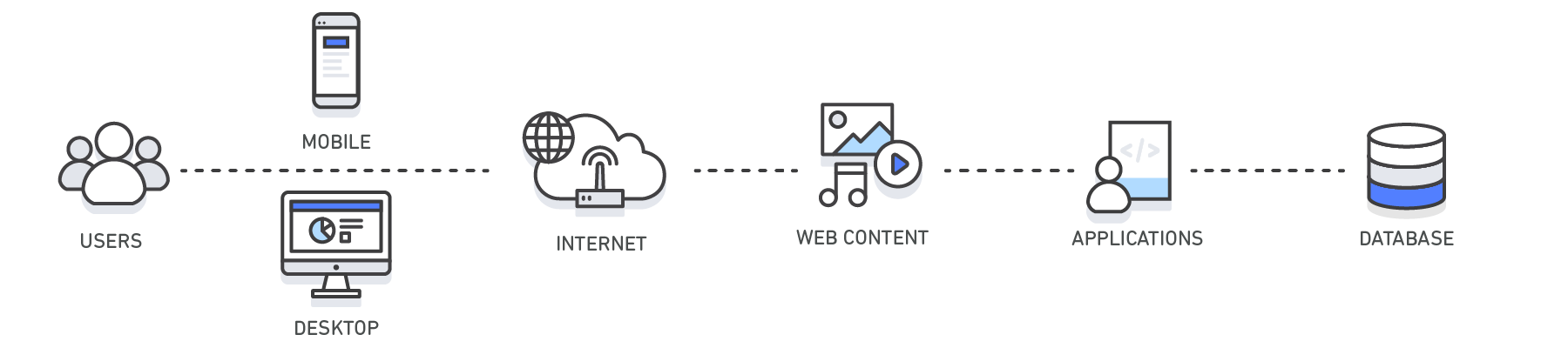
| Layer | Client-Side | DNS | Web | App | Database |
| Use Case | Accelerate retrieval of web content from websites (browser or device) |
Domain to IP Resolution | Accelerate retrieval of web content from web/app servers. Manage Web Sessions (server side) | Accelerate application performance and data access | Reduce latency associated with database query requests |
| Technologies | HTTP Cache Headers, Browsers | DNS Servers | HTTP Cache Headers, CDNs, Reverse Proxies, Web Accelerators, Key/Value Stores | Key/Value data stores, Local caches | Database buffers, Key/Value data stores |
| Solutions | Browser Specific | Amazon Route 53 | Amazon CloudFront, ElastiCache for Redis, ElastiCache for Memcached, Partner Solutions | Application Frameworks, ElastiCache for Redis, ElastiCache for Memcached, Partner Solutions | ElastiCache for Redis, ElastiCache for Memcached |
Caching with Amazon ElastiCache
Amazon ElastiCache
is a web service that makes it easy to deploy, operate, and scale an
in-memory data store or cache in the cloud. The service improves the
performance of web applications by allowing you to retrieve information
from fast, managed, in-memory data stores, instead of relying entirely
on slower disk-based databases. Learn how you can implement an effective
caching strategy with this technical whitepaper on in-memory caching.
Benefits of Caching
Improve Application Performance
Because memory is orders of magnitude faster than disk
(magnetic or SSD), reading data from in-memory cache is extremely fast
(sub-millisecond). This significantly faster data access improves the
overall performance of the application.
Reduce Database Cost
A single cache instance can provide hundreds of thousands
of IOPS (Input/output operations per second), potentially replacing a
number of database instances, thus driving the total cost down. This is
especially significant if the primary database charges per throughput.
In those cases the price savings could be dozens of percentage points.
Reduce the Load on the Backend
By redirecting significant parts of the read load from the
backend database to the in-memory layer, caching can reduce the load on
your database, and protect it from slower performance under load, or
even from crashing at times of spikes.
Predictable Performance
A common challenge in modern applications is dealing with
times of spikes in application usage. Examples include social apps
during the Super Bowl or election day, eCommerce websites during Black
Friday, etc. Increased load on the database results in higher latencies
to get data, making the overall application performance unpredictable.
By utilizing a high throughput in-memory cache this issue can be
mitigated.
Eliminate Database Hotspots
In many applications, it is likely that a small subset of
data, such as a celebrity profile or popular product, will be accessed
more frequently than the rest. This can result in hot spots in your
database and may require overprovisioning of database resources based on
the throughput requirements for the most frequently used data. Storing
common keys in an in-memory cache mitigates the need to overprovision
while providing fast and predictable performance for the most commonly
accessed data.
Increase Read Throughput (IOPS)
In addition to lower latency, in-memory systems also offer
much higher request rates (IOPS) relative to a comparable disk-based
database. A single instance used as a distributed side-cache can serve
hundreds of thousands of requests per second.
Use Cases & Industries
Learn about various caching use cases
Database Caching
The performance, both in speed and throughput that your
database provides can be the most impactful factor of your application’s
overall performance. And despite the fact that many databases today
offer relatively good performance, for a lot use cases your applications
may require more. Database caching allows you to dramatically increase
throughput and lower the data retrieval latency associated with backend
databases, which as a result, improves the overall performance of your
applications. The cache acts as an adjacent data access layer to your
database that your applications can utilize in order to improve
performance. A database cache layer can be applied in front of any type
of database, including relational and NoSQL databases. Common techniques
used to load data into you’re a cache include lazy loading and
write-through methods. For more information, click here.
Content Delivery Network (CDN)
When your web traffic is geo-dispersed, it’s not always
feasible and certainly not cost effective to replicate your entire
infrastructure across the globe. A CDN
provides you the ability to utilize its global network of edge
locations to deliver a cached copy of web content such as videos,
webpages, images and so on to your customers. To reduce response time,
the CDN utilizes the
nearest edge location to the customer or originating request location in
order to reduce the response time. Throughput is dramatically increased
given that the web assets are delivered from cache. For dynamic data,
many CDNs can be configured to retrieve data from the origin servers.
Amazon CloudFront is a global CDN service that accelerates delivery of your websites, APIs, video content or other web assets. It integrates with other Amazon Web Services products to give developers and businesses an easy way to accelerate content to end users with no minimum usage commitments. To learn more about CDNs, click here.
Amazon CloudFront is a global CDN service that accelerates delivery of your websites, APIs, video content or other web assets. It integrates with other Amazon Web Services products to give developers and businesses an easy way to accelerate content to end users with no minimum usage commitments. To learn more about CDNs, click here.
Domain Name System (DNS) Caching
Every domain request made on the internet essentially queries DNS
cache servers in order to resolve the IP address associated with the
domain name. DNS caching can occur on many levels including on the OS,
via ISPs and DNS servers.
Amazon Route 53 is a highly available and scalable cloud Domain Name System (DNS) web service.
Amazon Route 53 is a highly available and scalable cloud Domain Name System (DNS) web service.
Session Management
HTTP sessions contain the user data exchanged between your
site users and your web applications such as login information,
shopping cart lists, previously viewed items and so on. Critical to
providing great user experiences on your website is managing your HTTP
sessions effectively by remembering your user’s preferences and
providing rich user context. With modern application architectures,
utilizing a centralized session management data store is the ideal
solution for a number of reasons including providing, consistent user
experiences across all web servers, better session durability when your
fleet of web servers is elastic and higher availability when session
data is replicated across cache servers.
For more information, click here.
For more information, click here.
Application Programming Interfaces (APIs)
Today, most web applications are built upon APIs. An API
generally is a RESTful web service that can be accessed over HTTP and
exposes resources that allow the user to interact with the application.
When designing an API, it’s important to consider the expected load on
the API, the authorization to it, the effects of version changes on the
API consumers and most importantly the API’s ease of use, among other
considerations. It’s not always the case that an API needs to
instantiate business logic and/or make a backend requests to a database
on every request. Sometimes serving a cached result of the API will
deliver the most optimal and cost-effective response. This is especially
true when you are able to cache the API response to match the rate of
change of the underlying data. Say for example, you exposed a product
listing API to your users and your product categories only change once
per day. Given that the response to a product category request will be
identical throughout the day every time a call to your API is made, it
would be sufficient to cache your API response for the day. By caching
your API response, you eliminate pressure to your infrastructure
including your application servers and databases. You also gain from
faster response times and deliver a more performant API.
Amazon API Gateway is a fully managed service that makes it easy for developers to create, publish, maintain, monitor, and secure APIs at any scale.
Amazon API Gateway is a fully managed service that makes it easy for developers to create, publish, maintain, monitor, and secure APIs at any scale.
Caching for Hybrid Environments
In a hybrid cloud environment, you may have applications
that live in the cloud and require frequent access to an on-premises
database. There are many network topologies that can by employed to
create connectivity between your cloud and on-premises environment
including VPN and Direct Connect. And while latency from the VPC to your
on-premises data center may be low, it may be optimal to cache your
on-premises data in your cloud environment to speed up overall data
retrieval performance.
Web Caching
When delivering web content to your viewers, much of the
latency involved with retrieving web assets such as images, html
documents, video, etc. can be greatly reduced by caching those artifacts
and eliminating disk reads and server load. Various web caching
techniques can be employed both on the server and on the client side.
Server side web caching typically involves utilizing a web proxy which
retains web responses from the web servers it sits in front of,
effectively reducing their load and latency. Client side web caching can
include browser based caching which retains a cached version of the
previously visited web content. For more information on Web Caching, click here.
General Cache
Accessing data from memory is orders of magnitude faster
than accessing data from disk or SSD, so leveraging data in cache has a
lot of advantages. For many use-cases that do not require transactional
data support or disk based durability, using an in-memory key-value
store as a standalone database is a great way to build highly performant
applications. In addition to speed, application benefits from high
throughput at a cost-effective price point. Referenceable data such
product groupings, category listings, profile information, and so on are
great use cases for a general cache. For more information on general cache, click here.
Integrated Cache
An integrated cache is an in-memory layer that automatically caches frequently accessed data from the origin database. Most commonly, the underlying database will utilize the cache to serve the response to the inbound database request given the data is resident in the cache. This dramatically increases the performance of the database by lowering the request latency and reducing CPU and memory utilization on the database engine. An important characteristic of an integrated cache is that the data cached is consistent with the data stored on disk by the database engine.What are NoSQL databases?
NoSQL databases are purpose built for specific data models
and have flexible schemas for building modern applications. NoSQL
databases are widely recognized for their ease of development,
functionality, and performance at scale. They use a variety of data
models, including document, graph, key-value, in-memory, and search.
This page includes resources to help you better understand NoSQL
databases and to get started.
For decades, the predominant data model that was used for application development was the relational data model used by relational databases such as Oracle, DB2, SQL Server, MySQL, and PostgreSQL. It wasn’t until the mid to late 2000s that other data models began to gain significant adoption and usage. To differentiate and categorize these new classes of databases and data models, the term “NoSQL” was coined. Often the term “NoSQL” is used interchangeably with “nonrelational.”
For decades, the predominant data model that was used for application development was the relational data model used by relational databases such as Oracle, DB2, SQL Server, MySQL, and PostgreSQL. It wasn’t until the mid to late 2000s that other data models began to gain significant adoption and usage. To differentiate and categorize these new classes of databases and data models, the term “NoSQL” was coined. Often the term “NoSQL” is used interchangeably with “nonrelational.”
What's New for AWS Purpose-Built, Nonrelational Databases
How Does a NoSQL (nonrelational) Database Work?
NoSQL databases use a variety of data models for accessing
and managing data, such as document, graph, key-value, in-memory, and
search. These types of databases are optimized specifically for
applications that require large data volume, low latency, and flexible
data models, which are achieved by relaxing some of the data consistency
restrictions of other databases.
Consider the example of modeling the schema for a simple book database:
Consider the example of modeling the schema for a simple book database:
- In a relational database, a book record is often dissembled
(or “normalized”) and stored in separate tables, and relationships are
defined by primary and foreign key constraints. In this example, the Books table has columns for ISBN, Book Title, and Edition Number, the Authors table has columns for AuthorID and Author Name, and finally the Author-ISBN table has columns for AuthorID and ISBN.
The relational model is designed to enable the database to enforce
referential integrity between tables in the database, normalized to
reduce the redundancy, and generally optimized for storage.
- In a NoSQL database, a book record is usually stored as a JSON document. For each book, the item, ISBN, Book Title, Edition Number, Author Name, and AuthorID are
stored as attributes in a single document. In this model, data is
optimized for intuitive development and horizontal scalability.
Why should you use a NoSQL database?
NoSQL databases are a great fit for many modern applications
such as mobile, web, and gaming that require flexible, scalable,
high-performance, and highly functional databases to provide great user
experiences.
- Flexibility: NoSQL databases generally provide flexible schemas that enable faster and more iterative development. The flexible data model makes NoSQL databases ideal for semi-structured and unstructured data.
- Scalability: NoSQL databases are generally designed to scale out by using distributed clusters of hardware instead of scaling up by adding expensive and robust servers. Some cloud providers handle these operations behind-the-scenes as a fully managed service.
- High-performance: NoSQL database are optimized for specific data models (such as document, key-value, and graph) and access patterns that enable higher performance than trying to accomplish similar functionality with relational databases.
- Highly functional: NoSQL databases provide highly functional APIs and data types that are purpose built for each of their respective data models.
Types of NoSQL Databases

Key-value: Key-value databases are highly
partitionable and allow horizontal scaling at scales that other types of
databases cannot achieve. Use cases such as gaming, ad tech, and IoT
lend themselves particularly well to the key-value data model. Amazon DynamoDB
is designed to provide consistent single-digit millisecond latency for
any scale of workloads. This consistent performance is a big part of why
the Snapchat Stories feature, which includes Snapchat's largest storage write workload, moved to DynamoDB.

Document: Some developers do not think of their
data model in terms of denormalized rows and columns. Typically, in the
application tier, data is represented as a JSON document because it is
more intuitive for developers to think of their data model as a
document. The popularity of document databases has grown because
developers can persist data in a database by using the same document
model format that they use in their application code. DynamoDB and
MongoDB are popular document databases that provide powerful and
intuitive APIs for flexible and agile development.

Graph: A graph database’s purpose is to make it
easy to build and run applications that work with highly connected
datasets. Typical use cases for a graph database include social
networking, recommendation engines, fraud detection, and knowledge
graphs. Amazon Neptune
is a fully-managed graph database service. Neptune supports both the
Property Graph model and the Resource Description Framework (RDF),
providing the choice of two graph APIs: TinkerPop and RDF/SPARQL.
Popular graph databases include Neo4j and Giraph.

In-memory: Gaming and ad-tech applications have
use cases such as leaderboards, session stores, and real-time analytics
that require microsecond response times and can have large spikes in
traffic coming at any time. Amazon ElastiCache offers Memcached and Redis, to serve low-latency, high-throughput workloads, such as McDonald’s, that cannot be served with disk-based data stores. Amazon DynamoDB Accelerator (DAX) is another example of a purpose-built data store. DAX makes DynamoDB reads an order of magnitude faster.

Search: Many applications output logs to help developers troubleshoot issues. Amazon Elasticsearch Service (Amazon ES)
is purpose built for providing near-real-time visualizations and
analytics of machine-generated data by indexing, aggregating, and
searching semistructured logs and metrics. Amazon ES also is a powerful,
high-performance search engine for full-text search use cases. Expedia
is using more than 150 Amazon ES domains, 30 TB of data, and 30 billion
documents for a variety of mission-critical use cases, ranging from
operational monitoring and troubleshooting to distributed application
stack tracing and pricing optimization.
SQL (relational) vs. NoSQL (nonrelational) databases
Though there are many types of NoSQL databases with varying
features, the following table shows some of the differences between SQL
and NoSQL databases.
| Relational databases | NoSQL databases | |
|---|---|---|
| Optimal workloads |
Relational databases are designed for transactional and strongly consistent online transaction processing (OLTP) applications and are good for online analytical processing (OLAP). | NoSQL key-value, document, graph, and in-memory databases are designed for OLTP for a number of data access patterns that include low-latency applications. NoSQL search databases are designed for analytics over semi-structured data. |
| Data model | The relational model normalizes data into tables that
are composed of rows and columns. A schema strictly defines the tables,
rows, columns, indexes, relationships between tables, and other database
elements. The database enforces the referential integrity in
relationships between tables. |
NoSQL databases provide a variety of data models that includes document, graph, key-value, in-memory, and search. |
| ACID properties | Relational databases provide atomicity, consistency, isolation, and durability (ACID) properties:
|
NoSQL databases often make tradeoffs by relaxing some of the ACID properties of relational databases for a more flexible data model that can scale horizontally. This makes NoSQL databases an excellent choice for high throughput, low-latency use cases that need to scale horizontally beyond the limitations of a single instance. |
| Performance | Performance is generally dependent on the disk subsystem. The optimization of queries, indexes, and table structure is often required to achieve peak performance. | Performance is generally a function of the underlying hardware cluster size, network latency, and the calling application. |
| Scale | Relational databases typically scale up by increasing the compute capabilities of the hardware or scale-out by adding replicas for read-only workloads. | NoSQL databases typically are partitionable because key-value access patterns are able to scale out by using distributed architecture to increase throughput that provides consistent performance at near boundless scale. |
| APIs | Requests to store and retrieve data are communicated using queries that conform to a structured query language (SQL). These queries are parsed and executed by the relational database. | Object-based APIs allow app developers to easily store and retrieve in-memory data structures. Partition keys let apps look up key-value pairs, column sets, or semistructured documents that contain serialized app objects and attributes. |
SQL vs. NoSQL Terminology
The following table compares terminology used by select NoSQL databases with terminology used by SQL databases.
| SQL | MongoDB | DynamoDB | Cassandra | Couchbase |
|---|---|---|---|---|
| Table | Collection | Table | Table | Data bucket |
| Row | Document | Item | Row | Document |
| Column | Field | Attribute | Column | Field |
| Primary key | ObjectId | Primary key |
Primary key | Document ID |
| Index | Index | Secondary index | Index | Index |
| View | View | Global secondary index | Materialized view | View |
| Nested table or object | Embedded document | Map | Map | Map |
| Array | Array | List | List | List |
| List |
| List |
| Primary key |
DevOps is the combination of cultural philosophies,
practices, and tools that increases an organization’s ability to deliver
applications and services at high velocity: evolving and improving
products at a faster pace than organizations using traditional software
development and infrastructure management processes. This speed enables
organizations to better serve their customers and compete more
effectively in the market.

Under a DevOps model, development and operations teams
are no longer “siloed.” Sometimes, these two teams are merged into a
single team where the engineers work across the entire application
lifecycle, from development and test to deployment to operations, and
develop a range of skills not limited to a single function.
In some DevOps models, quality assurance and security teams may also become more tightly integrated with development and operations and throughout the application lifecycle. When security is the focus of everyone on a DevOps team, this is sometimes referred to as DevSecOps.
These teams use practices to automate processes that historically have been manual and slow. They use a technology stack and tooling which help them operate and evolve applications quickly and reliably. These tools also help engineers independently accomplish tasks (for example, deploying code or provisioning infrastructure) that normally would have required help from other teams, and this further increases a team’s velocity.
In some DevOps models, quality assurance and security teams may also become more tightly integrated with development and operations and throughout the application lifecycle. When security is the focus of everyone on a DevOps team, this is sometimes referred to as DevSecOps.
These teams use practices to automate processes that historically have been manual and slow. They use a technology stack and tooling which help them operate and evolve applications quickly and reliably. These tools also help engineers independently accomplish tasks (for example, deploying code or provisioning infrastructure) that normally would have required help from other teams, and this further increases a team’s velocity.

Move at high velocity so you can innovate for customers
faster, adapt to changing markets better, and grow more efficient at
driving business results. The DevOps model enables your developers and
operations teams to achieve these results. For example, microservices and continuous delivery let teams take ownership of services and then release updates to them quicker.

Increase the frequency and pace of releases so you can
innovate and improve your product faster. The quicker you can release
new features and fix bugs, the faster you can respond to your customers’
needs and build competitive advantage. Continuous integration and continuous delivery are practices that automate the software release process, from build to deploy.

Ensure the quality of application updates and
infrastructure changes so you can reliably deliver at a more rapid pace
while maintaining a positive experience for end users. Use practices
like continuous integration and continuous delivery to test that each change is functional and safe. Monitoring and logging practices help you stay informed of performance in real-time.
Operate and manage your infrastructure and development
processes at scale. Automation and consistency help you manage complex
or changing systems efficiently and with reduced risk. For example, infrastructure as code helps you manage your development, testing, and production environments in a repeatable and more efficient manner.

Build more effective teams under a DevOps cultural model,
which emphasizes values such as ownership and accountability.
Developers and operations teams collaborate
closely, share many responsibilities, and combine their workflows. This
reduces inefficiencies and saves time (e.g. reduced handover periods
between developers and operations, writing code that takes into account
the environment in which it is run).

Move quickly while retaining control and preserving
compliance. You can adopt a DevOps model without sacrificing security by
using automated compliance policies, fine-grained controls, and
configuration management techniques. For example, using infrastructure
as code and policy as code, you can define and then track compliance at scale.
Software and the Internet have transformed the world and
its industries, from shopping to entertainment to banking. Software no
longer merely supports a business; rather it becomes an integral
component of every part of a business. Companies interact with their
customers through software delivered as online services or applications
and on all sorts of devices. They also use software to increase
operational efficiencies by transforming every part of the value chain,
such as logistics, communications, and operations. In a similar way that
physical goods companies transformed how they design, build, and
deliver products using industrial automation throughout the 20th
century, companies in today’s world must transform how they build and
deliver software.
Transitioning to DevOps requires a change in culture and
mindset. At its simplest, DevOps is about removing the barriers between
two traditionally siloed teams, development and operations. In some
organizations, there may not even be separate development and operations
teams; engineers may do both. With DevOps, the two teams work together
to optimize both the productivity of developers and the reliability of
operations. They strive to communicate frequently, increase
efficiencies, and improve the quality of services they provide to
customers. They take full ownership for their services, often beyond
where their stated roles or titles have traditionally been scoped by
thinking about the end customer’s needs and how they can contribute to
solving those needs. Quality assurance and security teams may also
become tightly integrated with these teams. Organizations using a DevOps
model, regardless of their organizational structure, have teams that
view the entire development and infrastructure lifecycle as part of
their responsibilities.
There are a few key practices that help organizations
innovate faster through automating and streamlining the software
development and infrastructure management processes. Most of these
practices are accomplished with proper tooling.
One fundamental practice is to perform very frequent but small updates. This is how organizations innovate faster for their customers. These updates are usually more incremental in nature than the occasional updates performed under traditional release practices. Frequent but small updates make each deployment less risky. They help teams address bugs faster because teams can identify the last deployment that caused the error. Although the cadence and size of updates will vary, organizations using a DevOps model deploy updates much more often than organizations using traditional software development practices.
Organizations might also use a microservices architecture to make their applications more flexible and enable quicker innovation. The microservices architecture decouples large, complex systems into simple, independent projects. Applications are broken into many individual components (services) with each service scoped to a single purpose or function and operated independently of its peer services and the application as a whole. This architecture reduces the coordination overhead of updating applications, and when each service is paired with small, agile teams who take ownership of each service, organizations can move more quickly.
However, the combination of microservices and increased release frequency leads to significantly more deployments which can present operational challenges. Thus, DevOps practices like continuous integration and continuous delivery solve these issues and let organizations deliver rapidly in a safe and reliable manner. Infrastructure automation practices, like infrastructure as code and configuration management, help to keep computing resources elastic and responsive to frequent changes. In addition, the use of monitoring and logging helps engineers track the performance of applications and infrastructure so they can react quickly to problems.
Together, these practices help organizations deliver faster, more reliable updates to their customers. Here is an overview of important DevOps practices.
One fundamental practice is to perform very frequent but small updates. This is how organizations innovate faster for their customers. These updates are usually more incremental in nature than the occasional updates performed under traditional release practices. Frequent but small updates make each deployment less risky. They help teams address bugs faster because teams can identify the last deployment that caused the error. Although the cadence and size of updates will vary, organizations using a DevOps model deploy updates much more often than organizations using traditional software development practices.
Organizations might also use a microservices architecture to make their applications more flexible and enable quicker innovation. The microservices architecture decouples large, complex systems into simple, independent projects. Applications are broken into many individual components (services) with each service scoped to a single purpose or function and operated independently of its peer services and the application as a whole. This architecture reduces the coordination overhead of updating applications, and when each service is paired with small, agile teams who take ownership of each service, organizations can move more quickly.
However, the combination of microservices and increased release frequency leads to significantly more deployments which can present operational challenges. Thus, DevOps practices like continuous integration and continuous delivery solve these issues and let organizations deliver rapidly in a safe and reliable manner. Infrastructure automation practices, like infrastructure as code and configuration management, help to keep computing resources elastic and responsive to frequent changes. In addition, the use of monitoring and logging helps engineers track the performance of applications and infrastructure so they can react quickly to problems.
Together, these practices help organizations deliver faster, more reliable updates to their customers. Here is an overview of important DevOps practices.
The following are DevOps best practices:
- Continuous Integration
- Continuous Delivery
- Microservices
- Infrastructure as Code
- Monitoring and Logging
- Communication and Collaboration
Below you can learn more about each particular practice.

Continuous integration is a software development
practice where developers regularly merge their code changes into a
central repository, after which automated builds and tests are run. The
key goals of continuous integration are to find and address bugs
quicker, improve software quality, and reduce the time it takes to
validate and release new software updates.
Learn more about continuous integration »
Learn more about continuous integration »

Continuous delivery is a software development
practice where code changes are automatically built, tested, and
prepared for a release to production. It expands upon continuous
integration by deploying all code changes to a testing environment
and/or a production environment after the build stage. When continuous
delivery is implemented properly, developers will always have a
deployment-ready build artifact that has passed through a standardized
test process.
Learn more about continuous delivery and AWS CodePipeline »
Learn more about continuous delivery and AWS CodePipeline »

The microservices architecture is a design approach
to build a single application as a set of small services. Each service
runs in its own process and communicates with other services through a
well-defined interface using a lightweight mechanism, typically an
HTTP-based application programming interface (API). Microservices are
built around business capabilities; each service is scoped to a single
purpose. You can use different frameworks or programming languages to
write microservices and deploy them independently, as a single service,
or as a group of services.
Learn more about Amazon Container Service (Amazon ECS) »
Learn more about AWS Lambda »
Learn more about Amazon Container Service (Amazon ECS) »
Learn more about AWS Lambda »

Infrastructure as code is a practice in which
infrastructure is provisioned and managed using code and software
development techniques, such as version control and continuous
integration. The cloud’s API-driven model enables developers and system
administrators to interact with infrastructure programmatically, and at
scale, instead of needing to manually set up and configure resources.
Thus, engineers can interface with infrastructure using code-based tools
and treat infrastructure in a manner similar to how they treat
application code. Because they are defined by code, infrastructure and
servers can quickly be deployed using standardized patterns, updated
with the latest patches and versions, or duplicated in repeatable ways.
Learn to manage your infrastructure as code with AWS CloudFormation »
Learn to manage your infrastructure as code with AWS CloudFormation »
Developers and system administrators use code to
automate operating system and host configuration, operational tasks, and
more. The use of code makes configuration changes repeatable and
standardized. It frees developers and systems administrators from
manually configuring operating systems, system applications, or server
software.
Learn how you can configure and manage Amazon EC2 and on-premises systems with Amazon EC2 Systems Manager »
Learn to use configuration management with AWS OpsWorks »
Learn how you can configure and manage Amazon EC2 and on-premises systems with Amazon EC2 Systems Manager »
Learn to use configuration management with AWS OpsWorks »
With infrastructure and its configuration codified
with the cloud, organizations can monitor and enforce compliance
dynamically and at scale. Infrastructure that is described by code can
thus be tracked, validated, and reconfigured in an automated way. This
makes it easier for organizations to govern changes over resources and
ensure that security measures are properly enforced in a distributed
manner (e.g. information security or compliance with PCI-DSS or HIPAA).
This allows teams within an organization to move at higher velocity
since non-compliant resources can be automatically flagged for further
investigation or even automatically brought back into compliance.
Learn how you can use AWS Config and Config Rules to monitor and enforce compliance for your infrastructure »
Learn how you can use AWS Config and Config Rules to monitor and enforce compliance for your infrastructure »

Organizations monitor metrics and logs to see how
application and infrastructure performance impacts the experience of
their product’s end user. By capturing, categorizing, and then analyzing
data and logs generated by applications and infrastructure,
organizations understand how changes or updates impact users, shedding
insights into the root causes of problems or unexpected changes. Active
monitoring becomes increasingly important as services must be available
24/7 and as application and infrastructure update frequency increases.
Creating alerts or performing real-time analysis of this data also helps
organizations more proactively monitor their services.
Learn how you can use Amazon CloudWatch to monitor your infrastructure metrics and logs »
Learn how you can use AWS CloudTrail to record and log AWS API calls »
Learn how you can use Amazon CloudWatch to monitor your infrastructure metrics and logs »
Learn how you can use AWS CloudTrail to record and log AWS API calls »

Increased communication and collaboration in an
organization is one of the key cultural aspects of DevOps. The use of
DevOps tooling and automation of the software delivery process
establishes collaboration by physically bringing together the workflows
and responsibilities of development and operations. Building on top of
that, these teams set strong cultural norms around information sharing
and facilitating communication through the use of chat applications,
issue or project tracking systems, and wikis. This helps speed up
communication across developers, operations, and even other teams like
marketing or sales, allowing all parts of the organization to align more
closely on goals and projects.
What is Docker?
Docker lets you build, test, and deploy applications quickly

Docker is a software platform that allows you to build, test,
and deploy applications quickly. Docker packages software into
standardized units called containers
that have everything the software needs to run including libraries,
system tools, code, and runtime. Using Docker, you can quickly deploy
and scale applications into any environment and know your code will run.
Running Docker on AWS provides developers and admins a highly
reliable, low-cost way to build, ship, and run distributed applications
at any scale. AWS supports both Docker licensing models: open source
Docker Community Edition (CE) and subscription-based Docker Enterprise
Edition (EE).
How Docker works
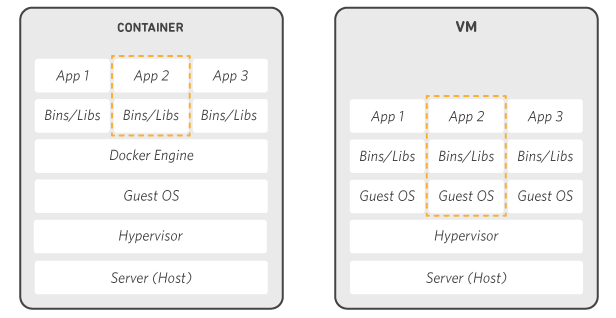
Docker works by providing a standard way to run your code. Docker is an operating system for containers. Similar to how a virtual machine virtualizes
(removes the need to directly manage) server hardware, containers
virtualize the operating system of a server. Docker is installed on each
server and provides simple commands you can use to build, start, or
stop containers.
AWS services such as AWS Fargate, Amazon ECS, Amazon EKS, and AWS Batch make it easy to run and manage Docker containers at scale.
AWS services such as AWS Fargate, Amazon ECS, Amazon EKS, and AWS Batch make it easy to run and manage Docker containers at scale.
Why use Docker
Using Docker lets you ship code faster, standardize
application operations, seamlessly move code, and save money by
improving resource utilization. With Docker, you get a single object
that can reliably run anywhere. Docker's simple and straightforward
syntax gives you full control. Wide adoption means there's a robust
ecosystem of tools and off-the-shelf applications that are ready to use
with Docker.

Ship More Software Faster
Docker users on average ship software 7x more frequently
than non-Docker users. Docker enables you to ship isolated services as
often as needed.

Standardize Operations
Small containerized applications make it easy to deploy, identify issues, and roll back for remediation.

Seamlessly Move
Docker-based applications can be seamlessly moved from local development machines to production deployments on AWS.

Save Money
Docker containers make it easier to run more code on each server, improving your utilization and saving you money.
When to use Docker
You can use Docker containers as a core building block
creating modern applications and platforms. Docker makes it easy to
build and run distributed microservices architecures, deploy your code
with standardized continuous integration and delivery pipelines, build
highly-scalable data processing systems, and create fully-managed
platforms for your developers.

Microservices
Build and scale distributed application architectures by
taking advantage of standardized code deployments using Docker
containers.

Continuous Integration & Delivery
Accelerate application delivery by standardizing environments and removing conflicts between language stacks and versions.

Data Processing
Provide big data processing as a service. Package data
and analytics packages into portable containers that can be executed by
non-technical users.

Containers as a Service
Build and ship distributed applications with content and infrastructure that is IT-managed and secured.
Docker frequently asked questions
Q: What is the difference between Docker and a virtual machine?
Virtual machines (VMs) virtualize (or remove the need to directly manage) server hardware while containers virtualize the operating system of a server. Docker is an operating system (or runtime) for containers. The Docker Engine is installed on each server you want to run containers on and provides a simple set of commands you can use to build, start, or stop containers.
Virtual machines (VMs) virtualize (or remove the need to directly manage) server hardware while containers virtualize the operating system of a server. Docker is an operating system (or runtime) for containers. The Docker Engine is installed on each server you want to run containers on and provides a simple set of commands you can use to build, start, or stop containers.
Run Docker on AWS
AWS provides support for both Docker open-source and
commercial solutions. There are a number of ways to run containers on
AWS, including Amazon Elastic Container Service (ECS) is a highly
scalable, high performance container management service. AWS Fargate is a
technology for Amazon ECS that lets you run containers in production
without deploying or managing infrastructure. Amazon Elastic Container
Service for Kubernetes (EKS) makes it easy for you to run Kubernetes on
AWS. AWS Fargate is technology for Amazon ECS that lets you run
containers without provisioning or managing servers. Amazon Elastic
Container Registry (ECR) is a highly available and secure private
container repository that makes it easy to store and manage your Docker
container images, encrypting and compressing images at rest so they are
fast to pull and secure. AWS Batch lets you run highly-scalable batch
processing workloads using Docker containers.
Comments
Post a Comment